
AI chatbot features
AI chatbot features for every WordPress site
Everything you need to answer visitors, collect leads and support your store. Start with the free plugin. Pro adds live chat, WooCommerce, analytics and more.
Free on WordPress.org · Pro from $49, pay once · No coding
Setup & AI
Set up in minutes, powered by OpenAI
A three-step wizard connects your OpenAI account, teaches the chatbot about your business and lets you test it before it goes live. You pay OpenAI directly for what you use.
Free
Setup wizard
Connect OpenAI, teach it your business, then test and go live. It checks your API key and account credit.
Free
Latest OpenAI models
Built on OpenAI’s Responses API. Choose the model, the reasoning effort and the verbosity.
Free
System instructions
Pick a role, specialization, tone and style in a few clicks, or write advanced instructions.
Training
Teach it your business in a few clicks
The chatbot answers from your own content: documents, pages, posts and the exact answers you write. Keep it current as your site changes.
Free
Upload files
PDF, Word, Markdown and more. The AI searches your documents when it answers.
Free
Quick learn
Choose up to 10 pages and the chatbot learns them in one click.
Free
Stays on your content
It is told to answer from what you teach it and never invent business details.
Pro
Scan Website
No page limit. Pages become Q&A pairs, posts and docs become Markdown files.
Pro
Automatic updates
Scanned posts and docs stay up to date when you edit them.
Pro
Q&A Builder
Up to 50 exact answers for questions that need a precise reply.
Design
Make it look like part of your site
Start from a style preset, then change the colors, name, avatar and every text. The live preview updates as you edit.
Free
Style presets
Aurora Blue, Midnight and Terracotta, ready to fine-tune.
Free
Colors, name and avatar
Main colors, chat window, messages, input and icons, plus your own chatbot image.
Free
Every text editable
Welcome message, placeholder, sub-header and error messages. Replies come in each visitor’s language.
Placement & engagement
Show it where it helps, and say hello first
Add a floating chat button to every page or embed the chatbot in any page. A proactive greeting invites visitors to ask before they leave.
Free
Floating chatbot
Left or right, with floating text and your own size. Hide it on chosen devices or pages, such as cart and checkout.
Free
Shortcode embed
Place the chatbot inside any page or post and set its width and height.
Free
Proactive greeting
Show it right away, after a delay or after scrolling, once per session, once per visitor or on every visit.
Free
Quick message box
Visitors type in the greeting card and the full chat opens with their message sent.
Free
Pre-made questions
Clickable questions help visitors start without typing.
Free
Chat menu
Sound notifications and a transcript download for visitors.
Conversations
Every conversation in one inbox
Read every chat, search them, translate any conversation into your language and export what you need. Keep an eye on usage and setup from the dashboard.
Free
Conversation history
Search and export every chat, with the visitor’s details.
Free
Translation
Translate any conversation into your language with one click.
Free
Request limits
Hourly and daily limits per visitor, plus a site-wide daily limit, keep costs predictable.
Free
Dashboard
Configuration status, optional features and recent activity at a glance.
Pro
Email visitors, with AI help
Email a visitor straight from Conversations. The AI can polish your message in the tone you choose.
Pro
Auto delete
Delete old conversations automatically after the time you choose.
Live chat & mobile app
Step in when a person is needed
Get a push notification on your phone, take over the chat and hand it back to the AI when you are done.
Pro
Live chat takeover
Take over any chat from the Mobile App and reply as yourself. The visitor sees when a person joins.
Pro
Mobile app (PWA)
Install it on your phone, get push notifications for new chats and reply on the go.
Pro
Live Agent accounts
Give team members the Live Agent role so they can answer chats in the app without access to the rest of WordPress.
Contact form
Let the AI hand over to your team
Visitors can send your team a message without leaving the chat. When a question needs a person, the AI offers the form and fills it in from the conversation. Messages arrive at your WordPress admin email, so you simply reply.
Pro
The AI offers it
When the AI can’t help, or a visitor asks for a person, it adds a Contact Form button to its reply. You decide when.
Pro
Filled in for the visitor
The AI sums up the request in the visitor’s language and picks the category. Name and email come from email capture.
Pro
Your own fields
Add a category list and up to two custom fields, such as a phone or order number. Every label and message is editable.
Pro
Photo attachments
Visitors can add up to 3 images of up to 3MB each, such as a screenshot or a photo of the problem.
Pro
Spam protection
reCAPTCHA v3 with your own score threshold, plus a hidden bot trap and a limit of 3 messages per hour per email.
Pro
Open it from any link
Add ?wpiko_contact=open to a link, such as your Contact us button, to open the chat with the form ready.
Leads
Turn chats into contacts
Ask for a name and email before the chat starts, then download your contacts whenever you need them.
Pro
Email capture
Ask for a name and email before the chat starts.
Pro
Contact form
A form inside the chat that the AI fills in for the visitor, with photo attachments and reCAPTCHA.
Free
Download emails
Export your contacts as a CSV file, filtered by recent activity.
WooCommerce
A shop assistant for your store
The chatbot answers from your WooCommerce catalog, suggests products as cards and tells customers where their order is.
Pro
Product cards
Products shown in the chat with image, title and price.
Pro
Recommendations
Suggestions that fit the question, from up to 1,000 products.
Pro
Order lookup
Order status with the order number and the checkout email.
Analytics
See what your visitors need
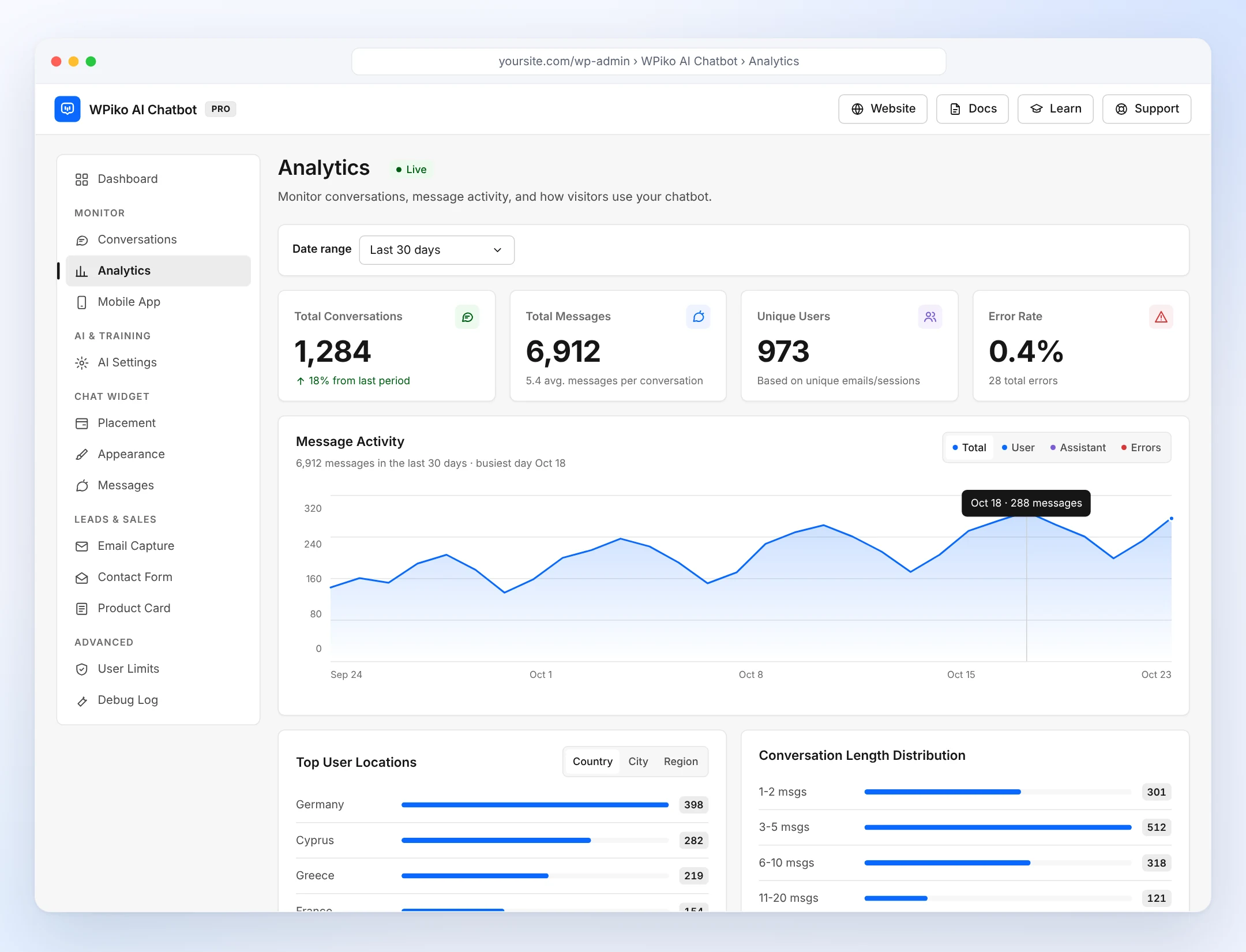
Track conversations, messages, unique users and the error rate, then see when visitors chat, where they are and which devices they use.
Pro
Key metrics
Conversations, messages, unique users and error rate, compared with the previous period.
Pro
Reports
Top locations, peak hours, devices and conversation length.
Pro
Message activity
A day-by-day chart with Total, User, Assistant and Errors views.
Free vs Pro
Start free. Upgrade when you need more.
The free plugin covers setup, training from files and pages, the chat widget and your conversations. Pro adds Scan Website, live chat, leads, WooCommerce and analytics, with a lifetime license.
Try WPiko AI Chatbot on your site today
Install the free plugin in a few minutes. Upgrade to Pro whenever you are ready.
Free on WordPress.org · Pay once for Pro · 30-day money-back guarantee